

If your eSIM has stopped working in Turkey, there are five likely culprits, in order of probability: a BTK-related access block, data roaming switched off, a device that isn’t carrier-unlocked, a plan that’s expired or run out of data, or a wrong APN setting. Work through them in that order below and you’ll usually be back online in a few minutes.
1. Check If Your Provider Is Affected by the BTK Restriction
Start here, because it’s the one cause that has nothing to do with your phone and no amount of toggling settings will fix it.
Since 2025, Turkey’s telecoms regulator, BTK, has restricted access to the websites and apps of several eSIM providers from within Turkey. This affects your ability to buy a new plan, top up, or reach a provider’s app/portal while you’re in the country — it doesn’t disable the eSIM technology itself, and most pre-purchased or already-activated plans keep working normally.
We’ve covered the mechanics of the restriction in full elsewhere; the short version you need here is: if your provider is on the affected list, that’s very likely your problem, not a device fault.
Diagnostic Fix: Check the current status of your specific provider on our live tracker before adjusting device settings: Which Turkey eSIM Providers Still Work →. For the full background on why this is happening, read The 2026 Turkey eSIM Ban, Explained →.
Providers confirmed affected as of writing include Airalo, Holafly, Saily, and Nomad — check the live tracker for the full, updated picture.
2. Data Roaming Isn’t Enabled
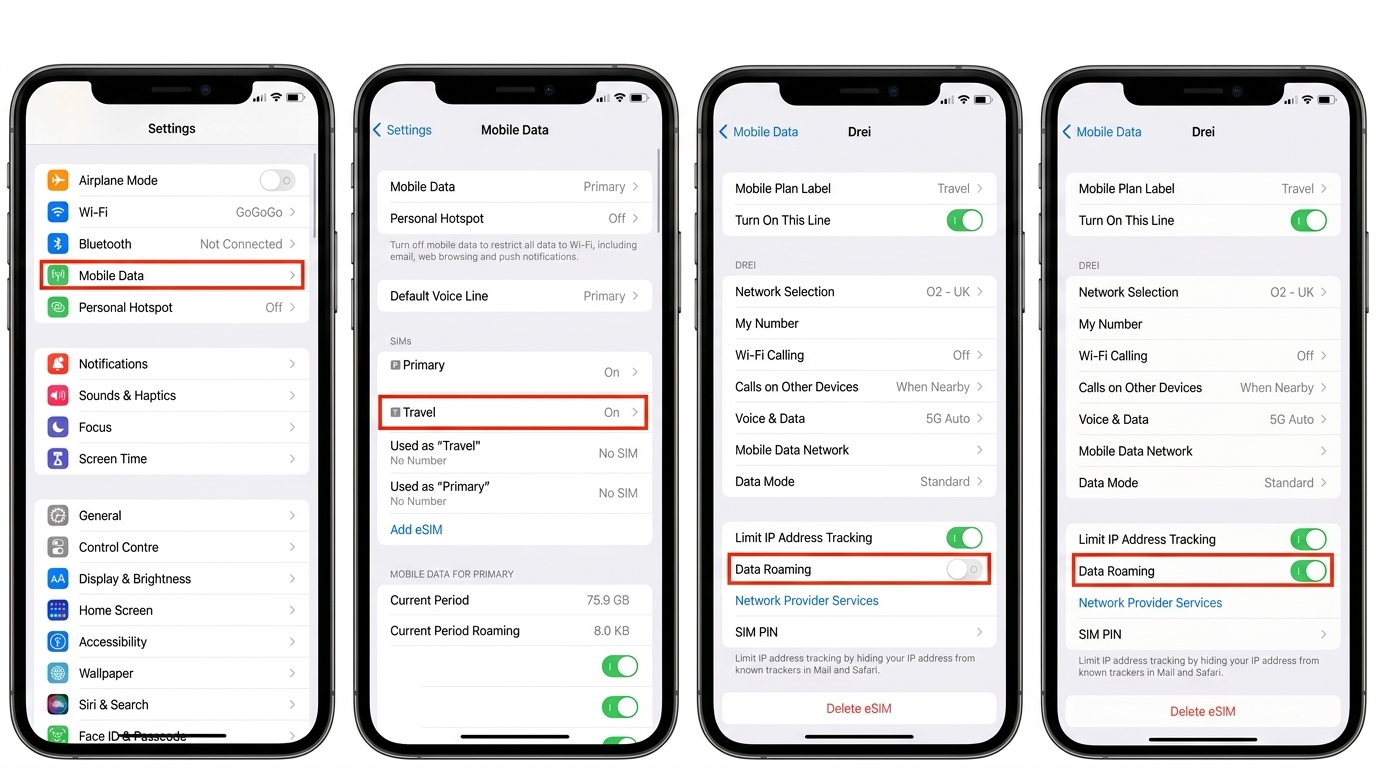
The most common fault, and the easiest to fix. Installing an eSIM doesn’t automatically turn on roaming for it — that’s a separate toggle in your operating system.
- iPhone: Settings → Mobile Service (or Cellular) → tap your Turkey eSIM plan → Data Roaming → toggle ON.
- Android (Samsung, Pixel): Settings → Network & Internet (or Connections) → SIMs → select your Turkey eSIM → Roaming → toggle ON.
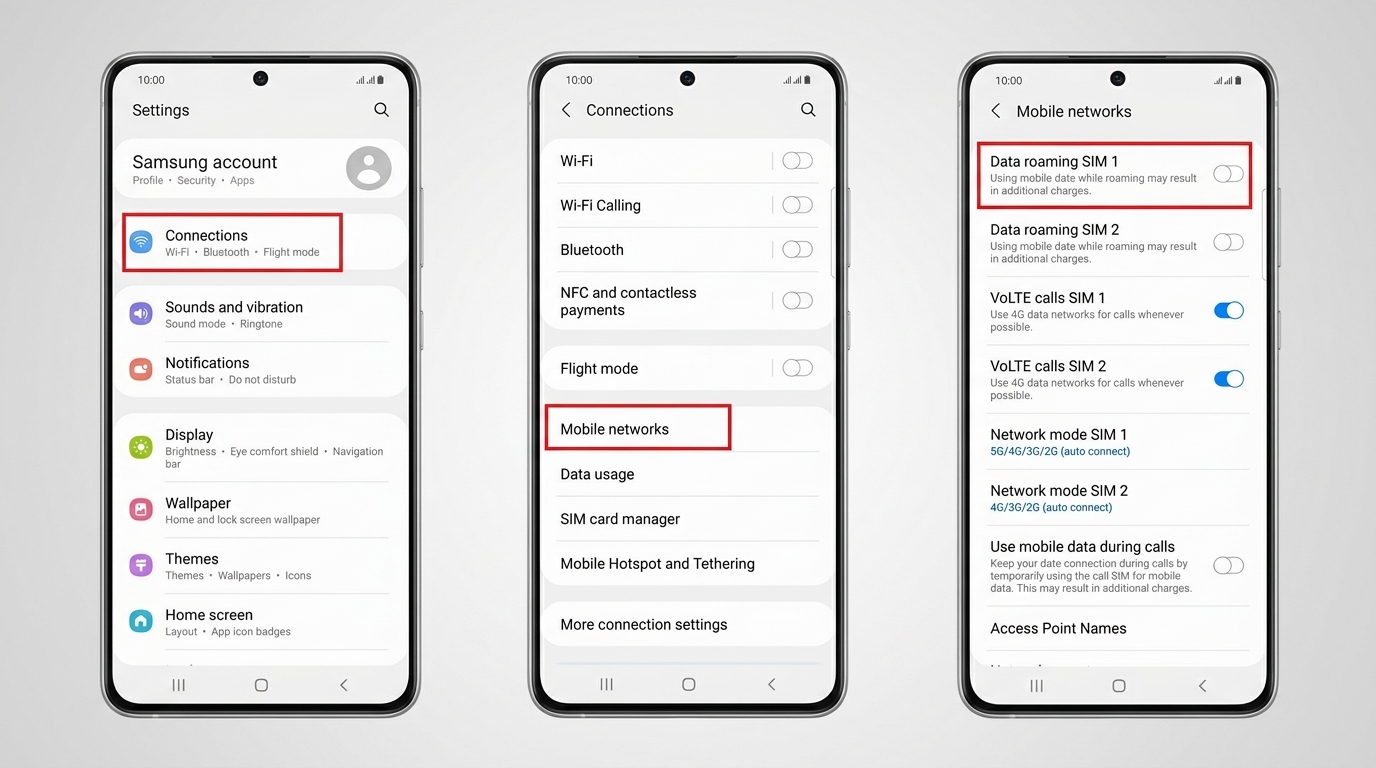
While you’re there, confirm that the Turkey eSIM line — not your UK primary physical SIM — is selected as the active Mobile Data line.
3. Your Device Isn’t Carrier-Unlocked
If your phone is locked to a UK network (common with contract handsets from EE, O2, Vodafone UK, or Three), it may refuse to activate a second, non-network eSIM profile, or accept the profile but refuse to authenticate with Turkish cellular towers.
How to Fix:
- Check your lock status before you leave the UK (Settings → General → About → Carrier Lock on iPhone should show “No SIM restrictions”).
- Most UK networks offer free online handset unlock requests once the device is paid off.
- If you’re already in Turkey and suspect a carrier lock, contact your UK mobile operator’s support desk (not the travel eSIM provider) to request a network unlock.
4. Your Plan Has Expired or Run Out of Data
Easy to overlook mid-trip, especially with validity-based plans rather than pure data caps — some plans expire on a strict calendar date regardless of how many gigabytes remain unused.
How to Fix:
- Open your provider’s app (if it’s still accessible — see step 1) or check the purchase confirmation email you received at checkout.
- If your plan has expired or exhausted its allowance, you will need to purchase a new plan or top up.
| Check | Where to Look |
|---|---|
| Data remaining | Provider app, or confirmation email if app is inaccessible |
| Validity end date | Original purchase confirmation email |
| Provider accessible in Turkey | Live Provider Status Table |
If your provider is on the affected list and you cannot access their app or storefront while on a Turkish network, refer to their dedicated review and support guide:
- Airalo Turkey Review & Support Details
- Holafly Turkey Review & Support Details
- Saily Turkey Review & Support Details
- Nomad Turkey Review & Support Details
5. APN Settings Are Wrong or Missing
Rare on modern iPhones and recent Android phones, since eSIM installation profiles configure the Access Point Name (APN) automatically. However, some Android handsets require manual APN entry.
How to Fix:
- Check your provider’s welcome email for the exact APN string required for their Turkey plan.
- On Android: Go to Settings → Network & Internet → Mobile Network → Access Point Names.
- Add a new APN entry matching your provider’s parameters and select it as active.
- Restart your device after saving.
Quick Recap: Troubleshooting Checklist
- Is your provider currently blocked? → Check our Live Status Tracker
- Is Data Roaming toggled ON for the eSIM? → Settings → Mobile Data → Roaming ON
- Is your device carrier-unlocked? → Verify “No SIM restrictions”
- Has your plan expired or run out of gigabytes? → Check confirmation email
- Is the APN configured correctly? → Verify provider APN profile
Still not sure if your specific provider is working right now? The fastest way to check is our live tracker: Which Turkey eSIM Providers Still Work →. If you need a fresh plan, explore the Best Turkey eSIM Comparison.