
💰 CHEAPEST
 Saily
Saily£2.99(£2.99 / GB)
Plan: 1 GB · 7 Days
- Network: Turkcell (4G/LTE/5G)
- 100% Digital · Instant Activation
- Hotspot & Tethering allowed
Google Pixel devices have featured native eSIM support since the Pixel 3 series in 2018. Renowned for a pure Android interface, setting up an eSIM on a Pixel is one of the fastest and smoothest experiences. Furthermore, the vast majority of Pixel devices sold in the UK through the Google Store, Amazon UK, and major retailers come factory-unlocked out of the box, ensuring instant compatibility with Turkish cellular networks.
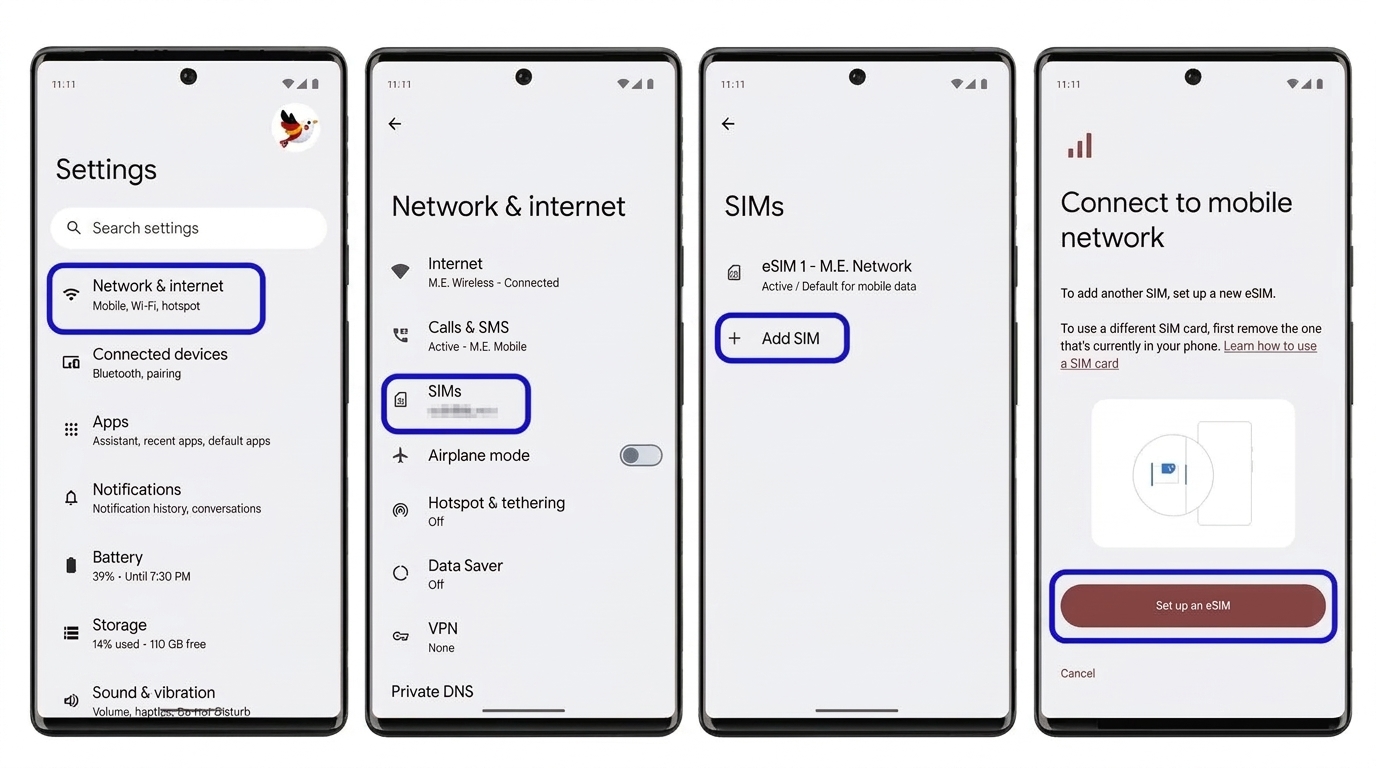
Step-by-step setup walkthrough for Stock Android 13, 14 & 15.
Connect your Pixel to Wi-Fi. Open Settings → tap 'Network & internet' → tap 'SIMs' → tap '+ Add SIM' (or 'Download a SIM instead').
When prompted 'Download your eSIM?', tap 'Next'. Point your Pixel's camera at the QR code sent by your Turkey eSIM provider and tap 'Download'.
Once the profile finishes downloading, tap 'Settings' on the confirmation screen and switch 'Use SIM' to ON.
In Settings → Network & internet → SIMs, select your newly added Turkey eSIM for 'Mobile data'. Keep your UK physical SIM selected for 'Calls' and 'SMS'.
After landing at Istanbul, Antalya, or Bodrum airport, tap your Turkey eSIM in SIM settings and ensure 'Roaming' is toggled ON. Turn off 'Automatic network selection' only if you wish to manually pin Turkcell or Türk Telekom.
Important device nuances depending on where your Google Pixel was purchased.
Pixel 7 and newer support Dual eSIM Dual Standby (DSDS) without needing any physical SIM card in the tray.
Supports Dual SIM using 1 physical nano-SIM + 1 digital eSIM active simultaneously.
UK Pixel models bought off-contract are fully factory-unlocked and accept international eSIM profiles immediately.
| Model | eSIM | Dual eSIM | Carrier lock note | Notes |
|---|---|---|---|---|
| Pixel 3 | ✓ | — | Must be carrier-unlocked (No SIM restrictions) | — |
| Pixel 3 XL | ✓ | — | Must be carrier-unlocked (No SIM restrictions) | — |
| Pixel 3a / 3a XL | ✓ | — | Must be carrier-unlocked (No SIM restrictions) | — |
| Pixel 4 / 4 XL | ✓ | ✓ | Must be carrier-unlocked (No SIM restrictions) | — |
| Pixel 4a / 4a 5G | ✓ | ✓ | Must be carrier-unlocked (No SIM restrictions) | — |
| Pixel 5 | ✓ | ✓ | Must be carrier-unlocked (No SIM restrictions) | — |
| Pixel 5a 5G | ✓ | — | Must be carrier-unlocked (No SIM restrictions) | — |
| Pixel 6 / 6 Pro | ✓ | ✓ | Must be carrier-unlocked (No SIM restrictions) | — |
| Pixel 6a | ✓ | ✓ | Must be carrier-unlocked (No SIM restrictions) | — |
| Pixel 7 / 7 Pro | ✓ | ✓ | Must be carrier-unlocked (No SIM restrictions) | Supports Dual eSIM (2 active eSIMs) |
| Pixel 7a | ✓ | ✓ | Must be carrier-unlocked (No SIM restrictions) | — |
| Pixel 8 / 8 Pro / 8a | ✓ | ✓ | Must be carrier-unlocked (No SIM restrictions) | Supports Dual eSIM (2 active eSIMs) |
| Pixel 9 / 9 Pro / 9 Pro XL | ✓ | ✓ | Must be carrier-unlocked (No SIM restrictions) | Supports Dual eSIM (2 active eSIMs) |
| Pixel 9 Pro Fold | ✓ | ✓ | Must be carrier-unlocked (No SIM restrictions) | — |
If your Google Pixel model is listed above, you cannot use an eSIM. You'll need a physical SIM card instead — available from Turkish carrier kiosks at major airports and in city centres.
These top-rated plans are fully compatible with your eSIM-enabled Google Pixel and provide excellent network coverage across Turkey.
Saily Breeze SIM
 Yesim
Yesimℹ️ Affiliate links — we may earn a small commission at no extra cost to you. Learn more
All Google Pixel models from Pixel 3 onwards (Pixel 3, 3a, 4, 4a, 5, 5a, 6, 6a, 7, 7a, 8, 8a, 9 series, and Pixel Fold/9 Pro Fold) support eSIM. Pixel 1 and Pixel 2 do not support eSIM.
Yes! From Pixel 7, Pixel 7 Pro, Pixel 8, and Pixel 9 onwards, Google introduced Multiple Enabled Profiles (MEP), allowing you to have two active eSIMs running simultaneously without any physical SIM card.
Pixel phones have built-in fast eSIM provisioning. Scanning the QR code typically downloads the carrier profile in under 45 seconds.
1. Confirm 'Roaming' is enabled under Settings → Network & internet → SIMs → [Turkey eSIM]. 2. Toggle Airplane Mode on for 10 seconds and off. 3. Check that your Pixel's APN settings match your provider's instructions.
Yes. Pixel Dual SIM functionality keeps your UK SIM active to receive free incoming SMS verification codes while using the Turkey eSIM exclusively for all mobile data traffic.